The voice in the machine.
An old computer that talks, and the rules that keep him charming.
Somewhere on this site, an old voice talks to you. You might hear him before you see him. He's the computer in the About section, a 1983 office PC with a navy screen and 640 KB of memory, and until you find him, he's just a voice from somewhere. When you do, he says it himself: “Ah… you found me. Yes, it was me talking all along.”
He began with a practical problem. In What I do, the page holds still while a scene plays, and a first-time visitor scrolling into it can easily think the site has frozen. A visual cue fixes that for everyone, so the next chapter's line now fills while the scene plays. But a voice turns the same moment into something you remember: “No, no… it's not stuck. Keep scrolling.”
Who he is
While recording voices for my About film, one old voice stood out, and it was too good to waste. It became the computer's. Before writing a single line, I wrote down who he is, because a character only works if he's the same person every time:
- Warm first, then wise, then playful. He likes you, and he's fond of me.
- A little grumpy, never mean. He teases himself: his back, his memory, his pixels. He never mocks you.
- He lives in his own world. Disks, kilobytes, booting up. No slang, no memes.
- He's short. Twelve words or fewer, one idea per line.
- He never sells. He doesn't explain the website, and he never pushes my work. The one exception is a joke: “Go on, say hello. He's nicer than me.”
Every new line has to pass that checklist before it's recorded.
When he speaks
A talking website can become unbearable in about ten seconds. So most of the work wasn't the lines; it was deciding when to stay quiet.
- He answers you. Pull the footer plug, put the floppy disk in the drive, open Let's talk, lean too close to his screen: you did something, so he replies. These always play.
- He rarely starts. The lines he begins on his own, like noticing you came back to the tab, that it's late at night, or that you're moving around by keyboard, are rationed: three a visit at most, at least 30 seconds apart.
- He never repeats himself in a visit. Each recording plays once. A few lines were recorded in several takes, and those rotate, across visits too, so coming back doesn't mean hearing the same delivery again.
- He never talks over a film. Not the intro, not the About film.
- lines in his whole vocabulary
- 22
- lines a visit he's allowed to start himself
- 3
- of quiet before he starts another
- 30 s
- words spoken over a film
- 0
Sound is a choice
Browsers won't play sound until you've touched the page, and they're right. So sound on this site is one decision, made once:
- Turn on the sound in the intro film, and the whole site remembers.
- A small speaker in the header shows the state and switches it.
- If sound is off when you reach the computer, it asks in its own words, in DOS:
C:\> Enable sound? (Y/N).
Most people browse with the sound off, especially on phones. So he was never allowed to depend on it.
The voice patch
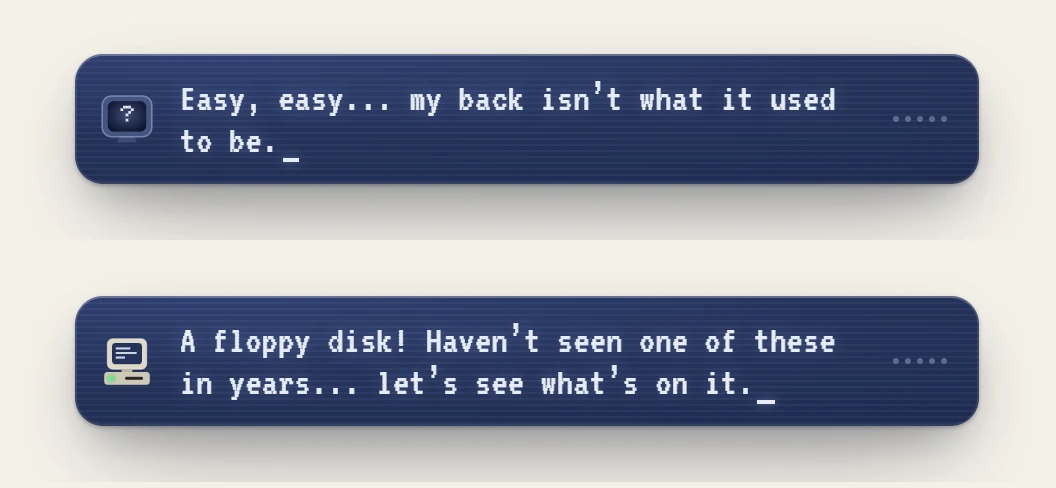
Every line appears in a small navy card in the corner, the colour of his screen. The words type themselves in step with his voice, and five little bars move as he speaks. With the sound off, the bars lie flat, so you can tell he's talking even when you can't hear him. Screen readers announce each line too.
The badge carries the joke. Until you've found him, it's a tiny screen with a question mark. The moment he says “you found me”, it becomes the computer.
The small things nobody sees
- His pauses are left alone. The recordings are levelled to the same volume, never trimmed. The silences are how he talks.
- He's never late. On a slow connection, a line waits a moment for its recording, then shows as text instead of answering a moment too late.
- He doesn't trip download managers. At first, a download manager on my own computer kept popping up, offering to save his recordings as MP3s. Your visitors would see that too, so his audio is served under a name those tools ignore. The sound is identical.
A website doesn't need a voice. But a detail like this is a small gift to the people who stay a little longer, and he's only there for the moments that earn it. Turn the sound on, find the computer, and pull the plug once. He'll tell you how he feels about it.
For developers How it’s builtgrandpa.js
Moments arrive as portfolio:moment events from the parts of the site they belong to: the plug, the disk, the story, Let's talk. The engine in src/grandpa/grandpa.js applies the rules:
- what he has said this visit lives in
sessionStorage; - the take rotation lives in
localStorage, so it carries across visits; - a queue makes sure he never says two lines at once;
- anything waits while a film, a dive or a dialog is open.
The hesitation in What I do is read from input events and the story's own data attributes: a fresh scroll the held scene swallowed, then a second try or two seconds of stillness. No layout is read per frame.
Recordings are MP3 bytes with a .voice extension, levelled to −20 LUFS. They're decoded with decodeAudioData and analysed by an AnalyserNode for the waveform. The caption is its own lazy chunk; none of this touches the site's 18 kB core.